
Built in India for
- Chartered Accountants
- Company Secretaries
- Cost and Management Accountants
Every task tracked from assignment to invoice.
Nexus is practice management for professional firms. Tasks, billing, revenue, clients, attendance, leave and articleship on one screen, and a rule the firm needs: a task is not finished until it is billed.
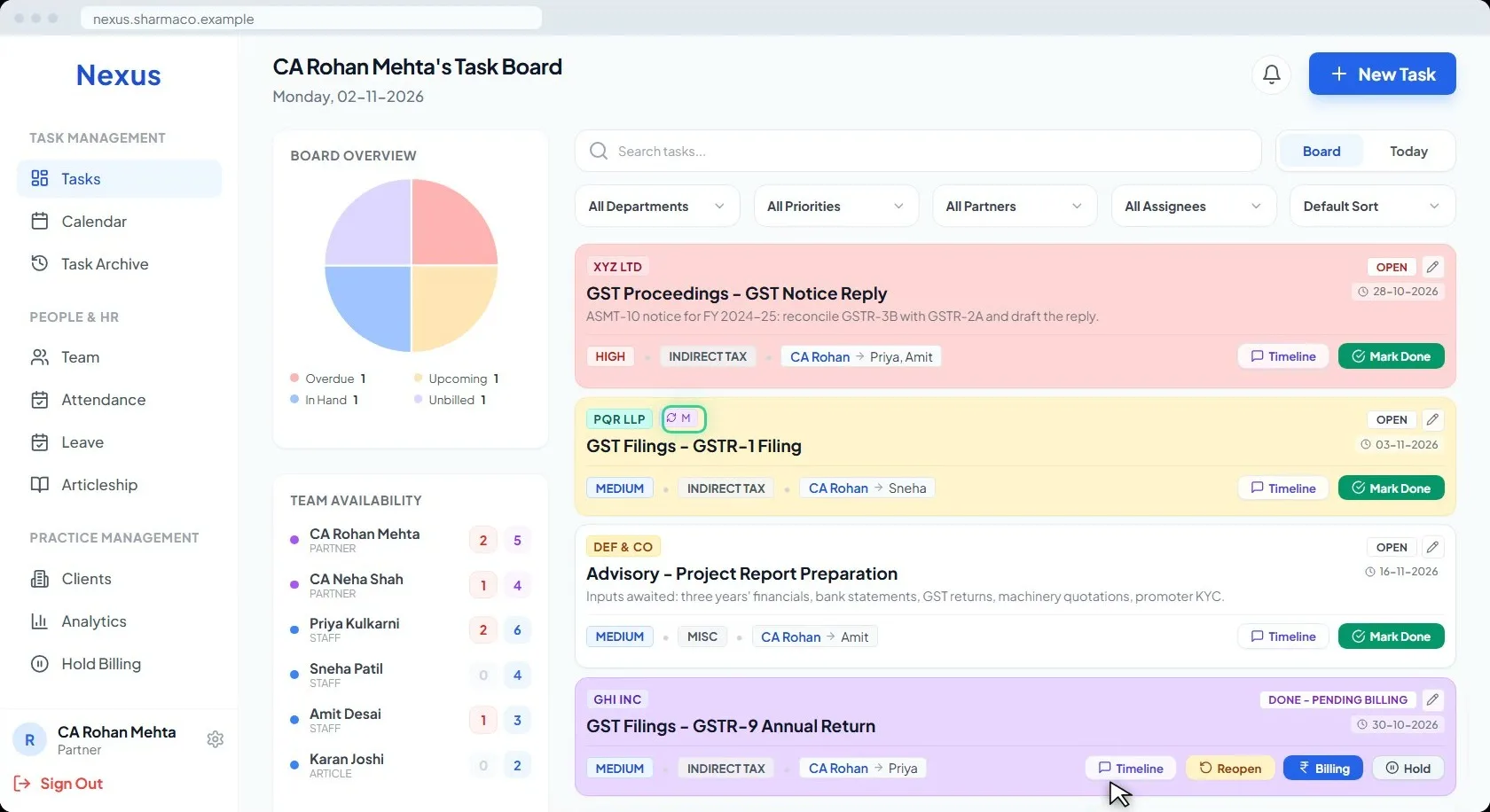
The board on a Monday morning. Red is overdue, yellow is due within two days, white is in hand, purple is done but not yet billed.
- 12
- features in one app
- AES-256
- encryption
- Android, iOS
- tablet and desktop
- Excel in
- and a backup out, any time
Three problems every firm knows
Three lines partners say, and what Nexus does about each.
The demo opens with them: billing that slips, a client that takes the time and not the fee, and nobody sure who owns a task.
“Work gets done, but billing gets delayed or forgotten.”
Done is not closed. It is Pending Billing.
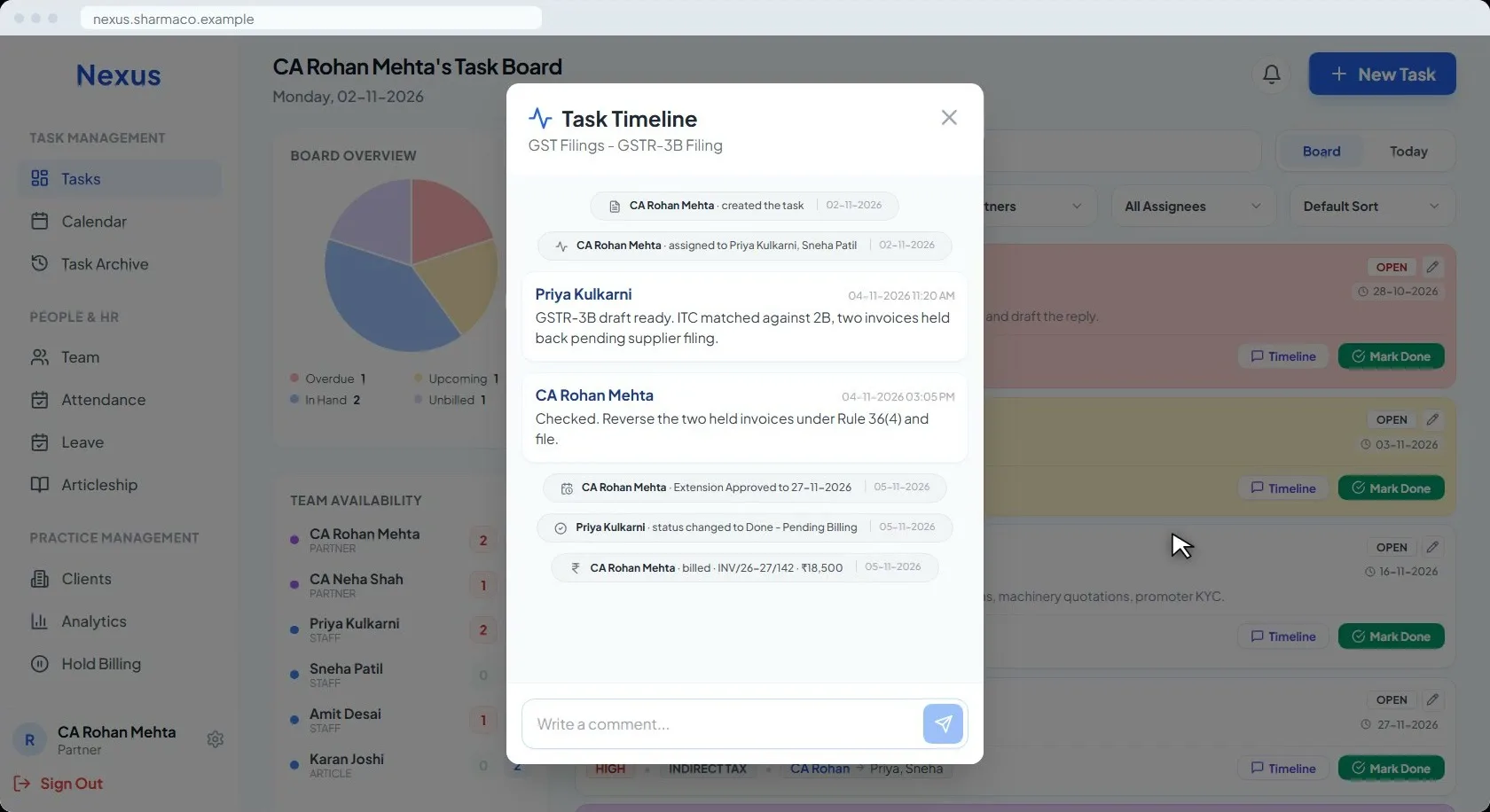
When the work is done, the task does not close. It asks for the fee and moves to Pending Billing, where it stays until someone records the invoice number, the amount and the partner split. Only then does it leave the board.
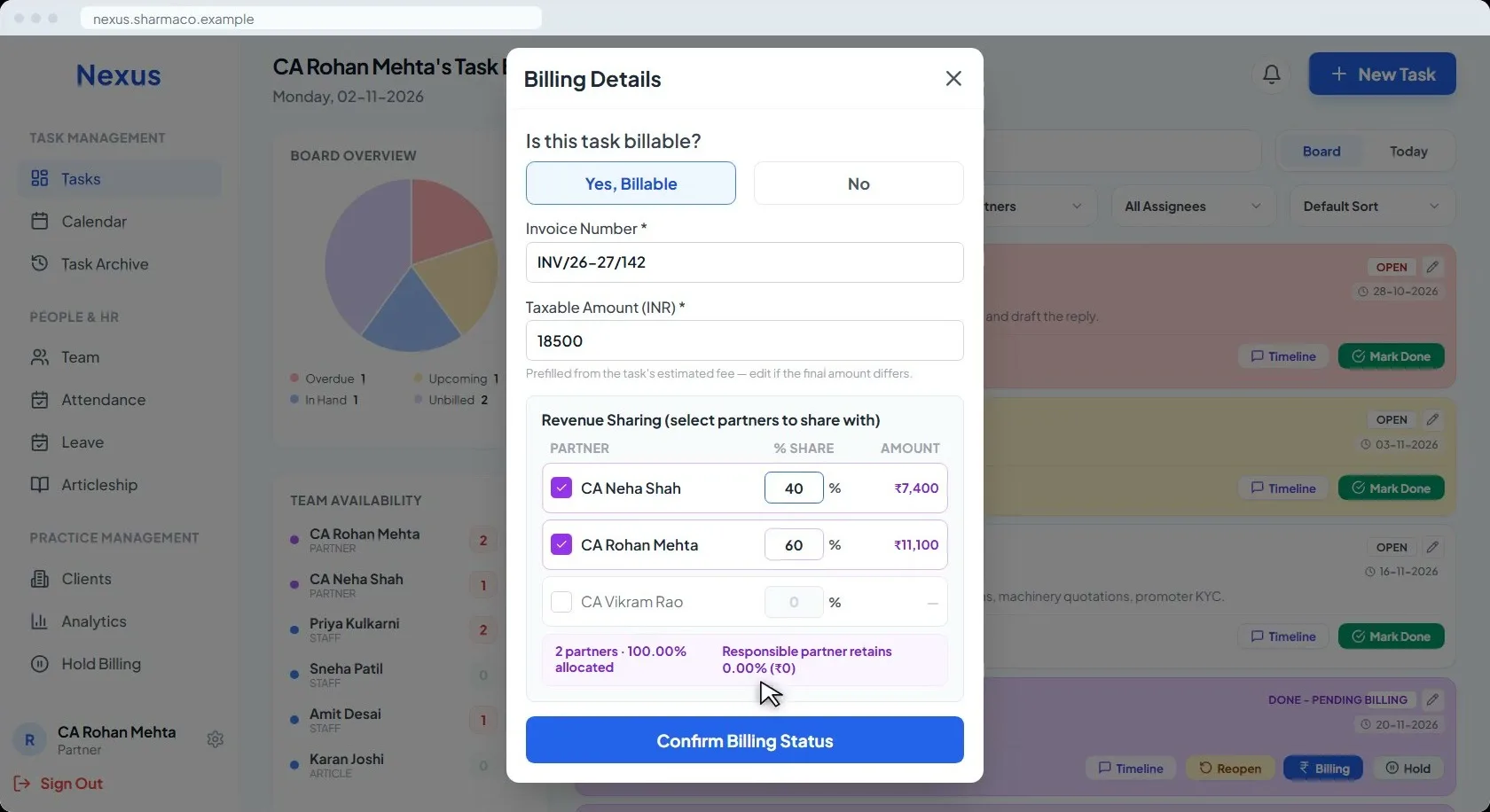
“80% of our time goes to a client that generates 10% of the revenue.”
Effort against fee, client by client.
Every partner sees their revenue month by month, and the client view shows how much of it sits with the top five clients and which clients return the least per task. You see who actually pays for your time, and decide what to do about it.
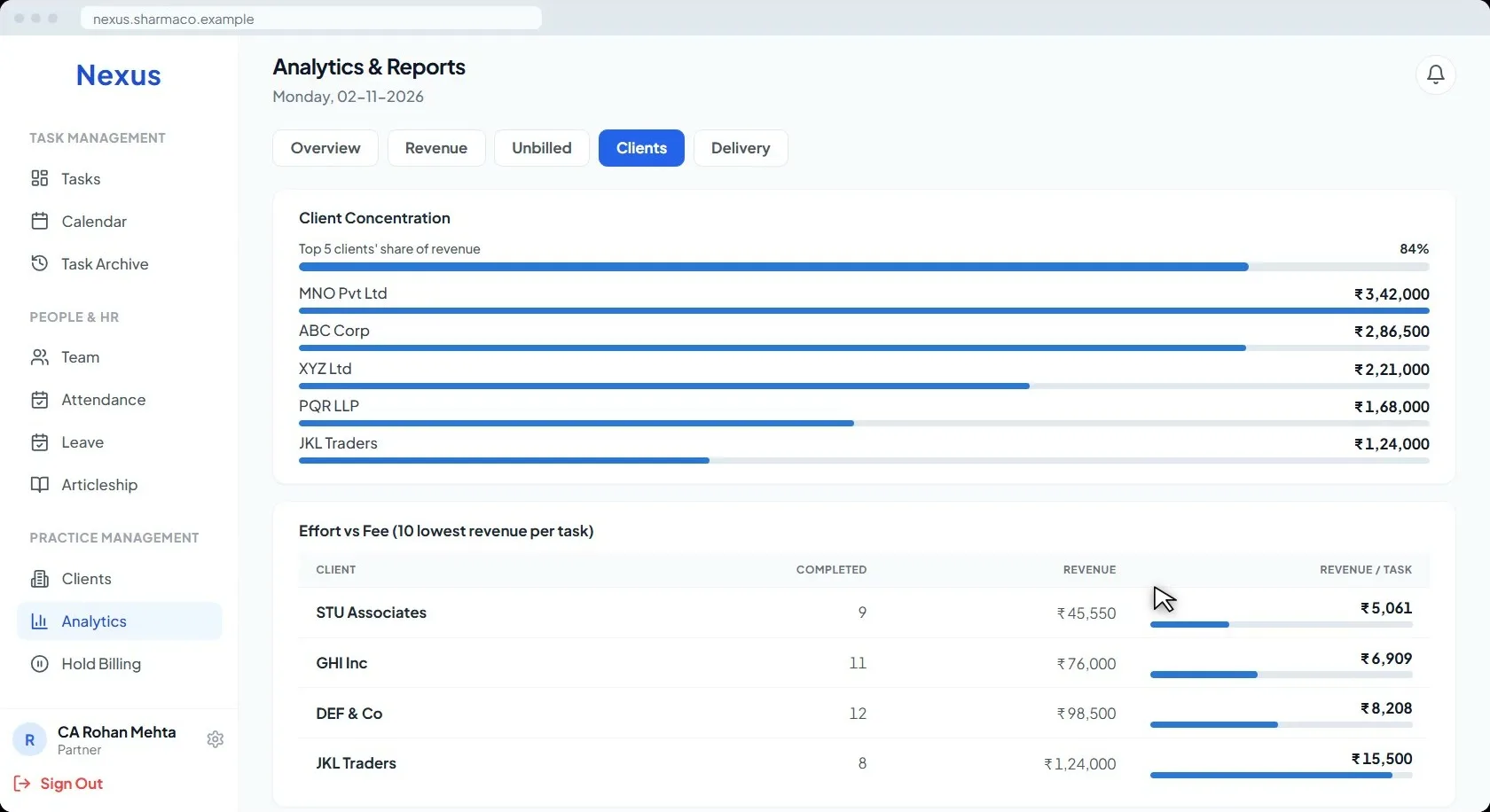
“I do not know who is accountable for which client task.”
A partner and makers on every task, and a full trail.
Every task names its responsible partner and its makers. A due date moves only when the partner approves the extension. Every action is logged with who did it and when: creation, assignment, comments, approvals, status changes and billing.
Twelve features, one platform
Everything your firm needs
Built for professional firms: the work, the billing, the people and the records, in one app.
- Task Board & WorkflowsEvery open task on one board, coloured by its state.
- Revenue AnalyticsPartner revenue, client concentration and effort against fee.
- Client RepositoryPAN, GST, contacts, every task and every invoice per client.
- Team ManagementPartners, staff and articles, with their roles and workload.
- Smart AttendanceOne tap to check in, a monthly register, a reminder at noon.
- Leave WorkflowsApply, approve, and track quotas.
- ArticleshipE-Diary and ICAI compliance, submitted from the app.
- Maker-Checker & Audit TrailsWho did what, and when, on every task.
- One App, Every DeviceCloud-based. Android, iOS, tablet or desktop.
- Billing TrackerDone is not closed. It is Pending Billing.
- Enterprise-Grade SecurityAES-256 encryption. A backup out whenever you want it.
- Letters & OnboardingAppointment letters from your own template.
- Every feature, with its screenThe screens are from the demo film: the app's own labels, buttons and statuses, on a fictional firm.See the features
Your firm, your structure
None of this is fixed.
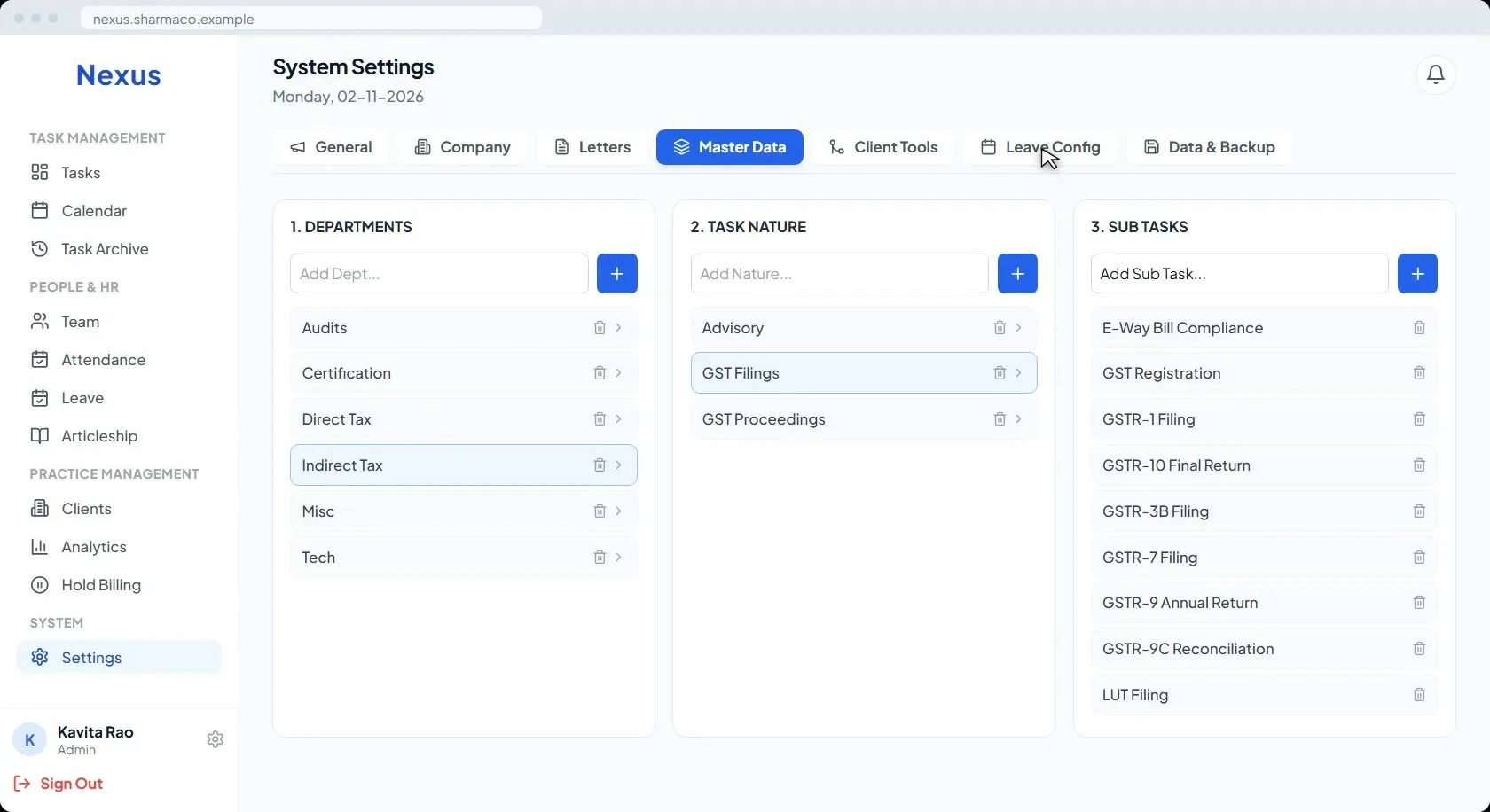
Your own departments, task natures and sub-tasks, added by you in the app at three levels. Your weekly offs and your own holiday list. Appointment letters from your own template, on your letterhead.
Your data, your hands
In from Excel. Out whenever you want.
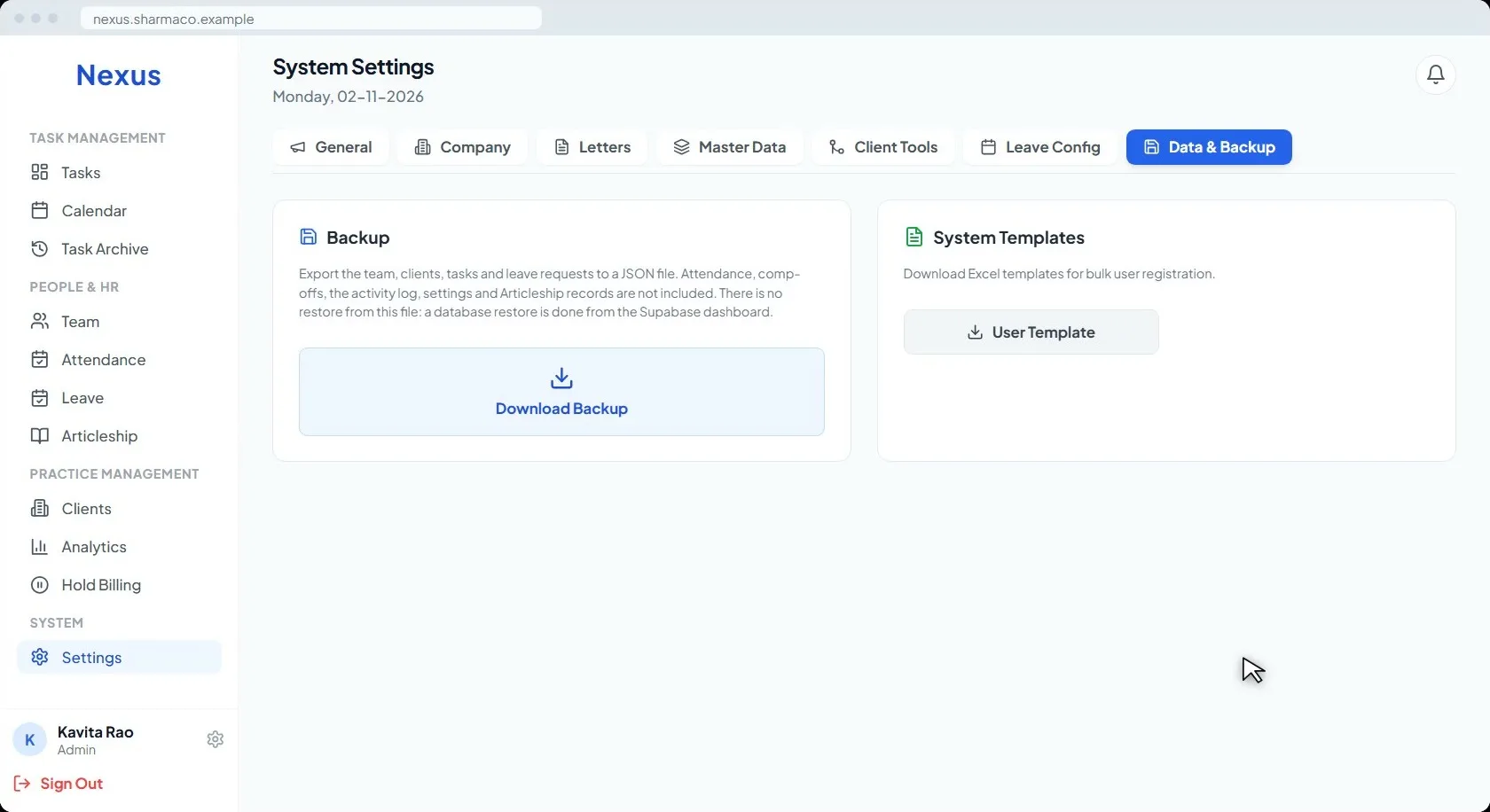
Clients come in from an Excel template, in bulk, and duplicates can be merged. The whole dataset, team, clients, tasks and leave, downloads as a backup whenever you want it. Data is protected with AES-256, enterprise-grade encryption.
One app, every device
Open it anywhere.
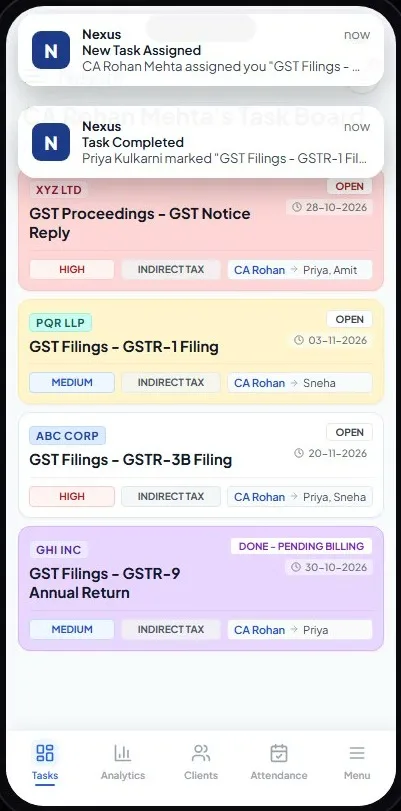
Nexus runs in the cloud. Android, iOS, tablet or desktop, the same app and the same data. Push notifications arrive when a task lands on you, when one is completed, when attendance is missed and when leave is requested.
- New task assigned
- Task completed
- Attendance reminder
- New leave request
The demo
Four minutes, every feature on screen.
The film shows the three problems above and the fix for each, then walks through the board, the structure, the people and the data. Nothing from YouTube loads until you press play.
Questions firms ask
Before the walkthrough
The questions partners ask first. Anything else, ask us directly.
Ask a questionWe run the firm on Excel and WhatsApp. What changes with Nexus?
The task, the person responsible, the due date, the fee and the invoice all live on one record instead of across a sheet, a chat and someone’s memory. A task cannot be closed without being billed or marked non-billable, so nothing done goes unbilled, and the partner sees the whole firm’s work on one board.
Is it only for chartered accountants?
It is built for CA, CS and CMA firms, and the departments, task natures and sub-tasks are yours to define, so any professional firm that does client work by task can run on it.
How does billing work?
When a task is marked done it asks whether it is billable and for the fee, then moves to Pending Billing. Billing is recorded on the task: invoice number, taxable amount and the partner split in the ratio you set. Nexus records the billing; your invoicing continues in whichever system you use today.
Who can see what?
Each firm sees only its own data. Within the firm, roles decide the view: partners see the firm’s work and revenue, staff and articles see their own tasks, attendance and leave, and an administrator manages settings and members.
Where is our data stored, and is it secure?
Nexus is cloud-based and the data is protected with AES-256, enterprise-grade encryption. The whole dataset downloads as a backup whenever you want it, so you always hold a copy.
Can we take our data out if we stop?
Yes. Download Backup exports the team, clients, tasks and leave records at any time, with no request to us needed.
How do we get our clients in?
Download the Excel template, fill it, upload it. Clients come in in bulk, and duplicates can be merged afterwards.
Does it work on phones?
Yes. One app for Android, iOS, tablet and desktop, with push notifications when a task is assigned or completed, when attendance is missed and when leave is requested.
Can we set our own departments, task types and holidays?
Departments, task natures and sub-tasks are added by you in the app, at three levels. Weekly offs and the holiday list are yours too. Leave types, priorities and task statuses are fixed.
What does it cost?
Pricing depends on the size of the firm and is discussed on the walkthrough. Get in touch and we will show you the app on your own kind of work first.
Next step
See it on your own kind of work
A walkthrough takes twenty minutes. Tell us the size of the firm and what you file most, and we will show you Nexus doing that.